Bulk InAs (HSE)
Bulk InAs (HSE)
In this step we will run our third calculation on bulk InAs where we use a hybrid functional (HSE06) to predict an accurate band gap.
Folder Layout
basic_trainingInAs_bulkhsescfbanddos
Basic Steps
- Run the SCF Calculations in the
scffolder. - Copy the WAVECAR file to the
bandanddosfolders.- HSE is a wavefunction based method so we use the WAVECAR instead of the CHG* files.
- Run the Band and DOS calculations.
- Plot the data.
Global Files
The POSCAR and POTCAR will be the same for the SCF, DOS, and Band calculations.
POSCAR
The POSCAR for the bulk InAs is given below
In1 As1
1.0
0.000000 3.029200 3.029200
3.029200 0.000000 3.029200
3.029200 3.029200 0.000000
In As
1 1
direct
0.000000 0.000000 0.000000 In
0.250000 0.250000 0.250000 As
POTCAR
The POTCAR can be easily generated using the potcar.sh script included in the basic training files.
To double check the elements in the POTCAR you can run the following command
The output will be the following
Automation
This entire calculation can be automated using a simple python script included below. You might notice that we don’t produce a KPOINTS file for the band structure calculation in this script. That is because the HSE calculation requires a special type of KPOINTS file which is dependent on the results from the SCF calculation, so we will generate it in the submission script. We also reduced the k-point grid density for the DOS calculation because HSE calculations are very expensive.
from os.path import isdir, join
import os
import shutil

dirs = ["scf", "dos", "band"]
base_dir = os.getcwd()

for d in dirs:
    print(d)

    if not isdir(d):
        os.mkdir(d)

    shutil.copy("POSCAR", join(d, "POSCAR"))

    os.chdir(d)
    os.system(f"incar.py --{d} --hse -c --kpar 8 --ncore 8")
    os.system("potcar.sh In As")

    if d == "scf":
        os.system("kpoints.py -g -d 7 7 7")
    elif d == "dos":
        os.system("kpoints.py -g -d 11 11 11")

    os.chdir(base_dir)
And it can be submitted to the cluster using the following script.
#!/bin/bash -l
#SBATCH -J hse # Job name
#SBATCH -N 8  # Number of nodes
#SBATCH -o stdout # File to which STDOUT will be written %j is the job #
#SBATCH -t 3:00:00
#SBATCH -q regular
#SBATCH -A m3578
#SBATCH --constraint=knl
export OMP_NUM_THREADS=1
module load vasp/5.4.4-knl

cd scf
srun -n 512 -c 4 --cpu_bind=cores vasp_ncl > vasp.out

fermi_str=$(grep 'E-fermi' OUTCAR)
fermi_array=($fermi_str)
efermi=${fermi_array[2]}
emin=`echo $efermi - 7 | bc -l`
emax=`echo $efermi + 7 | bc -l`
sed -i "s/EMIN = emin/EMIN = $emin/" ../dos/INCAR
sed -i "s/EMAX = emax/EMAX = $emax/" ../dos/INCAR

cp WAVECAR ../band
cp WAVECAR ../dos

cd ../band
kpoints.py -b -c GXWLGK -e --ibzkpt ../scf/IBZKPT -n 40
srun -n 512 -c 4 --cpu_bind=cores vasp_ncl > vasp.out

cd ../dos
srun -n 512 -c 4 --cpu_bind=cores vasp_ncl > vasp.out
SCF Calculation
The first step in any calculation is to perform the SCF calculation. In this section, the process to set up the input files will be shown. For a more detailed breakdown of the SCF calculation see Step 3 - Calculation Descriptions.
INCAR
As shown in section Step 3 - Calculation Descriptions the INCAR for an SCF calculation can be generated using the incar.py file.
This results in the following file.
# general
ALGO = Fast     # Mixture of Davidson and RMM-DIIS algos
PREC = N        # Normal precision
EDIFF = 1e-5    # Convergence criteria for electronic converge
NELM = 500      # Max number of electronic steps
ENCUT = 400     # Cut off energy
LASPH = True    # Include non-spherical contributions from gradient corrections
NBANDS = 24    # Number of bands to include in the calculation
BMIX = 3        # Mixing parameter for convergence
AMIN = 0.01     # Mixing parameter for convergence
SIGMA = 0.05    # Width of smearing in eV

# parallelization
KPAR = 8        # The number of k-points to be treated in parallel
NCORE = 8        # The number of bands to be treated in parallel

# scf
ICHARG = 2      # Generate CHG* from a superposition of atomic charge densities
ISMEAR = 0      # Fermi smearing
LCHARG = True   # Write the CHG* files
LWAVE = True   # Does not write the WAVECAR
LREAL = Auto    # Automatically chooses real/reciprocal space for projections

# soc
LSORBIT = True  # Turn on spin-orbit coupling
MAGMOM = 6*0 # Set the magnetic moment for each atom (3 for each atom)
Density of States Calculation
After the SCF calculation is finished, the WAVECAR file can be copied to the folder with the DOS calculation files. For a more detailed breakdown of the DOS calculation see section Step 3 - Calculation Descriptions.
INCAR
The INCAR for a DOS calculation can be generated using the incar.py file.
Which results in the following file. The values of EMIN and EMAX were automatically determined using the code shown in section Step 3 - Calculation Descriptions.
# general
ALGO = Fast     # Mixture of Davidson and RMM-DIIS algos
PREC = N        # Normal precision
EDIFF = 1e-5    # Convergence criteria for electronic converge
NELM = 500      # Max number of electronic steps
ENCUT = 400     # Cut off energy
LASPH = True    # Include non-spherical contributions from gradient corrections
NBANDS = 24    # Number of bands to include in the calculation
BMIX = 3        # Mixing parameter for convergence
AMIN = 0.01     # Mixing parameter for convergence
SIGMA = 0.05    # Width of smearing in eV

# parallelization
KPAR = 8        # The number of k-points to be treated in parallel
NCORE = 8        # The number of bands to be treated in parallel

# dos
ICHARG = 11     # Calculate eigenvalues from preconverged CHGCAR
ISMEAR = -5     # Tetrahedron method with Blochl corrections
LCHARG = False  # Does not write the CHG* files
LWAVE = False   # Does not write the WAVECAR files
LORBIT = 11     # Projected data (lm-decomposed PROCAR)
NEDOS = 3001    # 3001 points are sampled for the DOS
EMIN = -3.7174     # Minimum energy for the DOS plot
EMAX = 10.2826     # Maximum energy for the DOS plot

# soc
LSORBIT = True  # Turn on spin-orbit coupling
MAGMOM = 6*0 # Set the magnetic moment for each atom (3 for each atom)

# hse
LHFCALC = True  # Determines if a hybrid functional is used
HFSCREEN = 0.2  # Range-separation parameter
AEXX = 0.25     # Fraction of exact exchange to be used
PRECFOCK = Fast # Increases the speed of HSE Calculations
KPOINTS
For a DOS calculation we would like to have a denser kpoint mesh to get more accurate results. The code to generate the KPOINTS file is shown below. We will reduce the grid density for HSE due to its computationally expensive nature.
Results
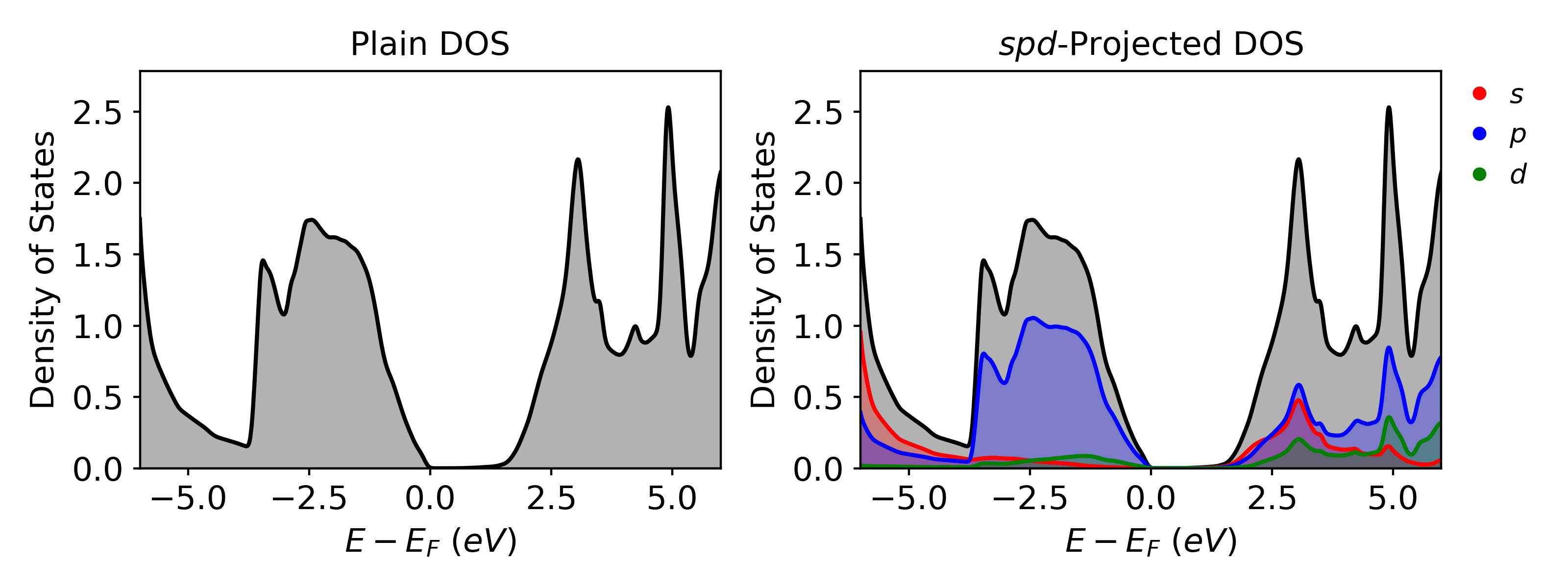
Once the calculation is completed, VaspVis can be used to visualize the density of states plots. The following code shows how to easily generate two DOS plots which will be saved as dos_plain.png and dos_spd.png which are shown below
Band Structure Calculation
After the SCF calculation is finished, the WAVECAR file can be copied to the folder with the Band calculation files. For a more detailed breakdown of the Band calculation see section Step 3 - Calculation Descriptions.
INCAR
The INCAR for a band structure calculation can be generated using the incar.py file.
Which results in the following file:
# general
ALGO = Fast     # Mixture of Davidson and RMM-DIIS algos
PREC = N        # Normal precision
EDIFF = 1e-5    # Convergence criteria for electronic converge
NELM = 500      # Max number of electronic steps
ENCUT = 400     # Cut off energy
LASPH = True    # Include non-spherical contributions from gradient corrections
NBANDS = 24    # Number of bands to include in the calculation
BMIX = 3        # Mixing parameter for convergence
AMIN = 0.01     # Mixing parameter for convergence
SIGMA = 0.05    # Width of smearing in eV

# parallelization
KPAR = 8        # The number of k-points to be treated in parallel
NCORE = 8        # The number of bands to be treated in parallel

# band
ICHARG = 11     # Calculate eigenvalues from preconverged CHGCAR
ISMEAR = 0      # Fermi smearing
LCHARG = False  # Does not write the CHG* files
LWAVE = False   # Does not write the WAVECAR files (True for unfolding)
LORBIT = 11     # Projected data (lm-decomposed PROCAR)

# soc
LSORBIT = True  # Turn on spin-orbit coupling
MAGMOM = 6*0 # Set the magnetic moment for each atom (3 for each atom)

# hse
LHFCALC = True  # Determines if a hybrid functional is used
HFSCREEN = 0.2  # Range-separation parameter
AEXX = 0.25     # Fraction of exact exchange to be used
PRECFOCK = Fast # Increases the speed of HSE Calculations
KPOINTS
For a band structure calculation, the KPOINTS file is the most important input because it determines the path of your band structure. Usually we find the path from literature or helpful tools such as SeeK-path. For our zinc-blende structures such as InAs we choose the k-path \(\Gamma-X-W-L-\Gamma-K\), which can be generated using the following code with kpoints.py. The HSE calculation has a special format which is described in Step 3 - Calculation Descriptions.
kpoints.py --band --coords GXWLGK --hse --ibzkpt ../scf/IBZKPT --nsegments 40
or
kpoints.py -b -c GXWLGK -e -i ../scf/IBZKPT -n 40
The resulting KPOINTS file will look like this:
Automatically generated mesh
    230
Reciprocal lattice
    0.00000000000000    0.00000000000000    0.00000000000000             1
    0.14285714285714    0.00000000000000   -0.00000000000000             4
    0.28571428571429    0.00000000000000   -0.00000000000000             4
    0.42857142857143   -0.00000000000000    0.00000000000000             4
   -0.42857142857143    0.00000000000000   -0.00000000000000             4
   ...
   ...
    0.34615384615385    0.34615384615385    0.69230769230769             0
    0.35576923076923    0.35576923076923    0.71153846153846             0
    0.36538461538462    0.36538461538462    0.73076923076923             0
    0.37500000000000    0.37500000000000    0.75000000000000             0
Results
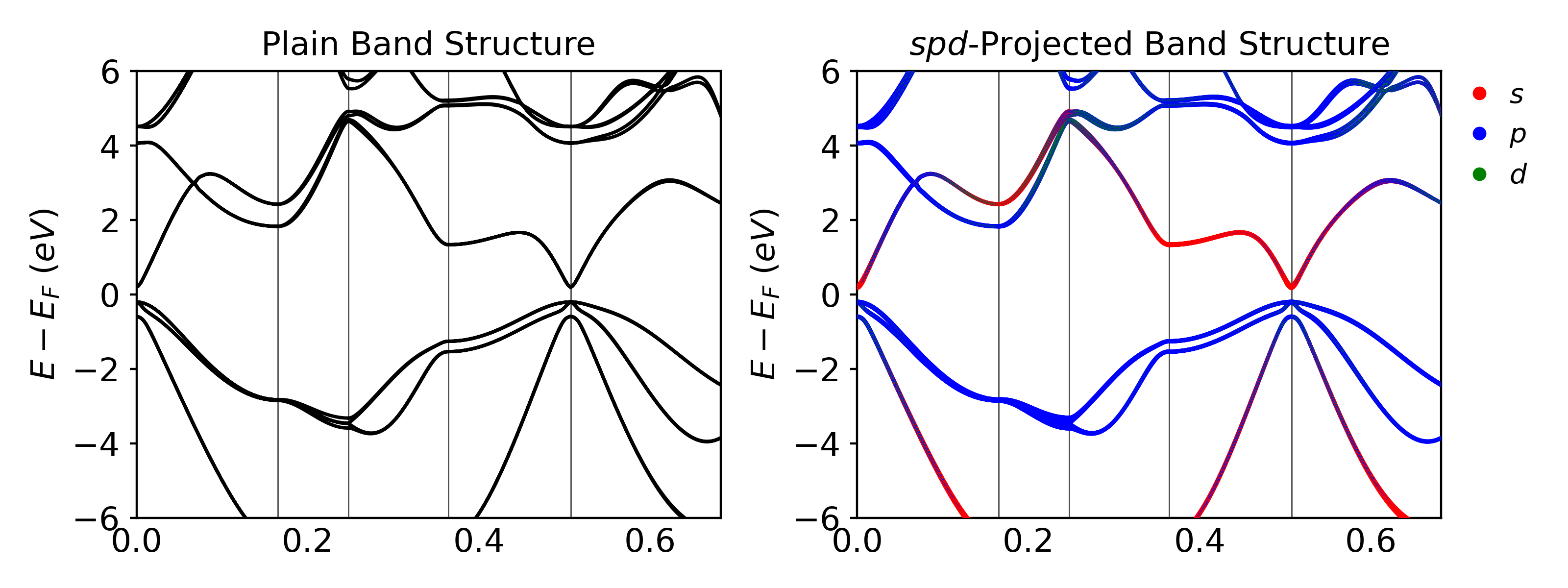
Once the calculation is completed, VaspVis can be used to visualize the band structure plots. The following code shows how to easily generate two band structure plots which will be saved as band_plain.png and band_spd.png which are shown below:
Concluding Notes
Some things to note about the results:
- This calculation was much more expensive than the PBE calculation. It took 25 minutes for the band calculation, and 1 hour for the DOS calculation using 8 nodes on the NERSC Cori machine.
- HSE+SOC properly predicts InAs to have a band gap of 0.39 eV which is very close to the experimental value.
- HSE06 is a hybrid functional known to give good band gap values for materials, which is why we will use it as our reference in the next step to fit the U-parameter for PBE+U.
Created : 22 janvier 2023